
The short answer
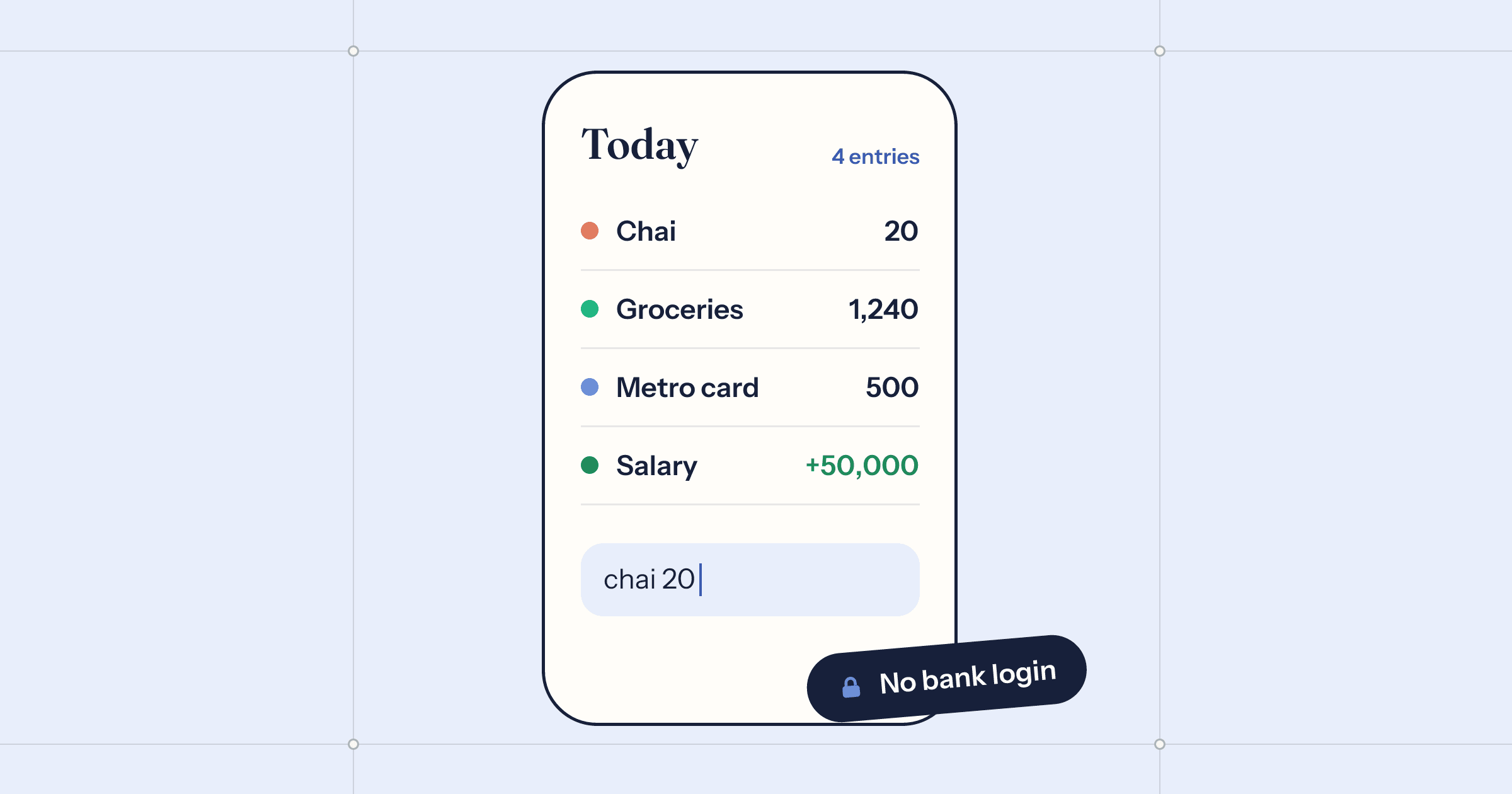
Use a manual expense tracker and keep the habit small: one wallet for each real place your money sits (cash, each bank account, each card), log every expense at the moment you pay, correct each wallet to your bank's balance once a week, and look at where the money went once a month. An app like PennyBook makes each entry about three seconds, keeps everything on your phone, and never asks for a bank login.
Most budgeting apps start by asking for your bank login. For a lot of people that is where the budget ends. Handing a third party standing access to every transaction you make is a reasonable thing to feel uneasy about, and it is a lot to ask before the app has shown you anything.
There is an older way that still works: write it down. We make PennyBook, a private expense tracker that has no bank connection on purpose, and this is the routine we have seen stick.
Why log by hand at all
Automatic imports are convenient, and that is exactly the problem. When transactions appear by themselves, you look at them the way you look at a bank statement: rarely, and with a slight wince. When you type “coffee 4.50” yourself, you notice it. The tenth time in a month, you notice that too. The small act of logging is where the awareness comes from.
There are practical reasons as well. Cash never shows up in a bank feed. Neither does money you lent a friend, or the split of a dinner bill. A manual book records what actually happened, not what one bank saw.
Set up wallets that match real life
A wallet is a place your money lives. Make one for each: the cash in your pocket, each bank account, each credit card, any e-wallet you use. Give each one its real current balance on day one, and do not try to enter the past.
Two rules keep the numbers honest. Every expense belongs to the wallet it was paid from. And moving money between your own wallets, such as an ATM withdrawal from the bank into cash or paying off a card, is a transfer, not spending. Count it as spending and your month looks twice as expensive as it was.
Make logging take three seconds
The habit lives or dies on friction. If writing down a coffee takes fifteen seconds, you will skip it, then the next one, then the whole week. So log at the moment you pay, with the phone already in your hand, and make the entry as short as possible.
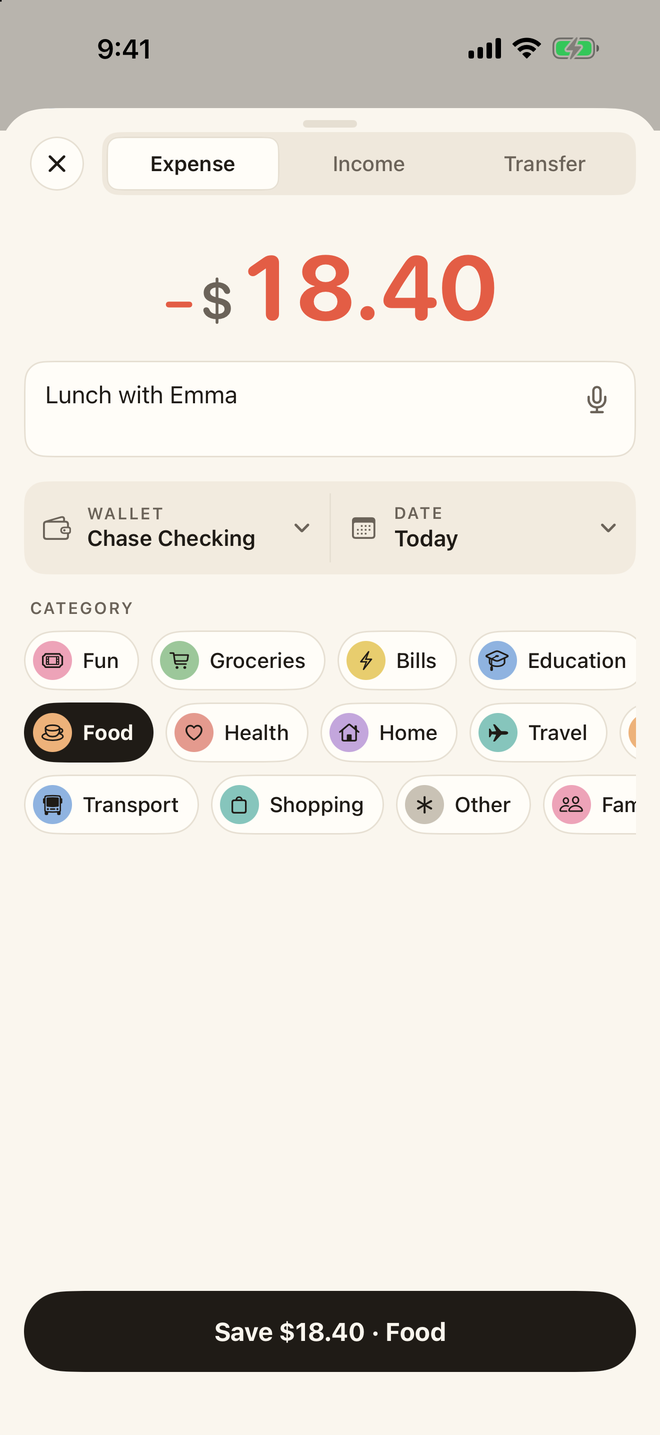
- Tap the plus button.
- Type the note and amount together, like chai 20 or groceries 1240. PennyBook fills in the amount and picks the category from what you filed before.
- Tap Save. The wallet is the one you used last.
Income works the same way with a plus sign, +50000 salary, and you can say the entry out loud instead; speech is recognised on the device. There are Home Screen and Lock Screen widgets too, and PennyBook works with Siri and Shortcuts.
Reconcile once a week
You will forget things. Everyone does. The trick is not to let small gaps pile up into a book you no longer trust. Once a week, open your banking app, look at the balance, and compare it with the wallet.
If you can see what is missing, add it. If you cannot, do not go digging. In PennyBook, pick the wallet and tap Adjust on its balance card, type the real balance, and it writes one visible entry for the difference. Nothing already in the book is changed, and the balance is right again. A tracker that is 98 percent complete and correct is worth far more than a perfect one you abandoned in March.
Look back once a month
Logging is half the value. The other half is the ten minutes at the end of the month when you look at where it all went. Not to feel bad, just to notice: which category grew, which one surprised you, whether you spent less than you earned.
PennyBook’s Insights shows a month, a quarter, a year or any dates you choose, with an overview, categories and habits. With Apple Intelligence on a supported device you can also just ask, “How much did I spend on food last month?” or “Did I save money this year?”, and get a chart with the entries behind it. Every figure is worked out from your own entries on the device; the model only writes the words around them.
Bringing your history with you
If you have tracked before, you do not have to start from zero. PennyBook imports from Money Lover, Wallet, Spendee, Monefy, Cashew, YNAB and CSV files, and the whole history comes over even on the free plan. There is a page on moving from Money Lover if that is where you are coming from.
PennyBook keeps everything on your iPhone, iPad or Mac, with Face ID if you want it, and syncs only through your own private iCloud if you switch that on. The first 100 entries are free, and Pro is $19.99 once, covering both the expense tracker and the net worth tracker. The help pages walk through every screen.
Questions
Is it safe to give a budgeting app my bank login?
Apps that link to a bank usually go through a data aggregator, which then holds ongoing access to your transactions. Many people are comfortable with that; if you are not, a manual tracker needs no bank access at all.
Does PennyBook connect to my bank?
No. PennyBook has no bank connection and no account. Entries stay on the device, or in your own private iCloud if you turn on sync.
What if I forget to log something?
Pick the wallet and tap Adjust on its balance card, then enter what the bank says. PennyBook writes one visible entry for the difference, so the balance is right again without rewriting history.
Can I import my history from another app?
Yes. PennyBook imports from Money Lover, Wallet, Spendee, Monefy, Cashew, YNAB and CSV files, and an import is never cut short by the free limit.
How much does PennyBook cost?
Your first 100 entries and 10 net worth items are free. PennyBook Pro is $19.99 once for both the expense tracker and the net worth tracker. There is no subscription.
 Almanac
 Whittle
 Porter