The short answer
Since iOS 18, Voice Memos shows a transcript of a recording: open the recording and tap the speech-bubble button. Audio you record inside a note in the Notes app gets a transcript too. If you want the words on screen while you talk, to fix mistakes, get tidy notes and search everything you have ever said, use an app built for it, such as Whittle, which transcribes on the iPhone itself and is free for 25 notes.
Most people who search for this have one recording in mind. A forty-minute call with the accountant. A lecture. A walk where you finally worked out what the second chapter is about. You do not want to listen to it again; you want to read it, copy two paragraphs out of it, and get on with your day.
The iPhone has quietly become good at this. Since iOS 18 there are two ways to get text from a recording without installing anything, and both are worth knowing. We make Whittle, a voice notes app, so we have a horse in this race; the built-in options come first anyway, because for a lot of people they are enough.
Option 1: the transcript in Voice Memos
Voice Memos writes out what was said in a recording. Open the recording in its full view and tap the transcript button, the small speech bubble. The words appear under the waveform, and tapping a line jumps the playback to that moment. You can select the text and copy it like any other.
This is the right tool for one-off jobs: a memo you already have, a single quote you need to find. It works on old recordings too, so the memo from March is not a lost cause.
Where it stops is everything after the transcript. The text is a single block in one app. There is no way to correct a name the speech engine keeps getting wrong, no search across all your recordings by what was said, and nothing that turns forty minutes of talking into something you would actually send to someone.
Option 2: record inside a note
The Notes app can record audio straight into a note, and it shows a transcript with the recording. Start a note, tap the paperclip, choose Record Audio, and talk. Because the audio lives inside a note, you can type around it: a heading, a few bullet points, a to-do you remembered halfway through.
This suits meetings where you want your own notes and a recording side by side. It is less suited to thinking out loud, which is where most voice notes come from. Five memos a day quickly become five notes with five transcripts, and you are back to reading raw speech, ums included.
Option 3: an app that writes while you talk
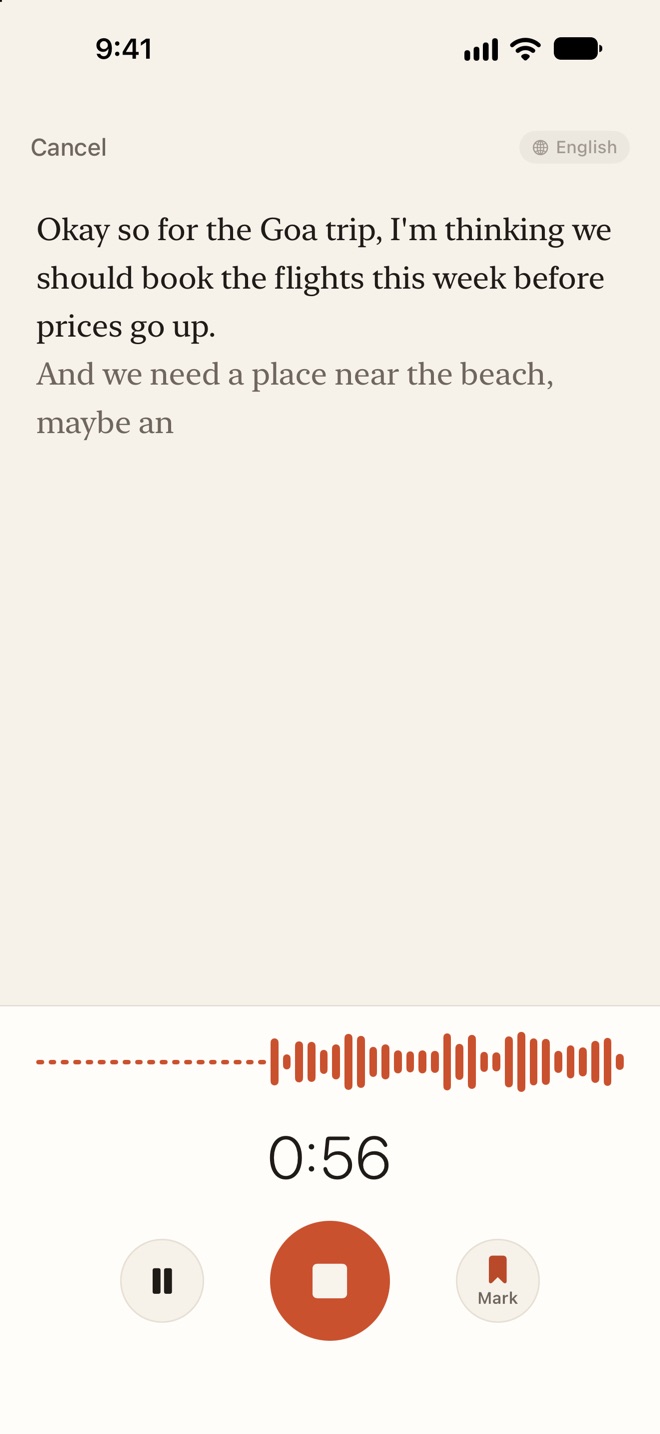
We built Whittle for the person who talks to their phone every day. You tap record and the transcript builds on screen as you speak, so you can see straight away whether the phone is keeping up. When you stop, you get two pages: the transcript, every word, and a tidy version in your own words with a title and up to three tags.
To turn a memo you already have into a Whittle note:
- Open the recording in Voice Memos (or a file in Files, or audio in WhatsApp).
- Tap Share and choose Save to Whittle.
- Open Whittle. The note is there, transcribed on your phone, with its title.
Inside Whittle you can also choose Import audio from the menu on the home screen and pick several files at once: m4a, mp3, wav, aac, caf, aiff, or a video, whose sound is used. Each becomes its own note.
The things that make a transcript useful after the fact are the small ones. Tap any sentence to hear it, which is the fastest way to check a quote. Tap a word that came out wrong, choose Fix, and Whittle offers to replace it everywhere in the note. Search finds a note by any word you said. Rewrite turns a ramble into an email, meeting minutes or bullet points, and Ask your notes answers a question from everything you have recorded, with links to the notes it used.
Getting a cleaner transcript
Whatever you use, the same speech engine is doing the listening, and it rewards the same habits.
- Pick the language before you record. A transcript in the wrong language is not a worse transcript, it is a different one. Whittle has it under Settings › Language › I speak, and on the recording screen.
- Hold the phone like a phone. Twenty or thirty centimetres from your mouth does more for accuracy than any setting. A phone face down on a table across the room hears the room.
- Teach it your names. People, places, product names and jargon are where speech engines stumble. Whittle keeps a list called Words Whittle should know, up to 100 words, and it listens for them in every recording. Each word you fix is added for you.
- Pause instead of stopping. One note with a pause in it reads better than three fragments. Whittle’s Keep talking adds a new recording to the end of an old note.
Where your audio goes
Voice notes are some of the most personal things on a phone: health worries, money, half finished ideas, other people’s names. It is worth knowing where they are processed before you pick a tool.
Whittle runs its transcription on the iPhone with Apple’s on-device speech engine, and its tidy notes, titles and answers come from Apple Intelligence on the device. There is no Whittle server, no account and no analytics. If you use iCloud, note text syncs through your own private iCloud database, and recordings only sync if you switch that on. Once a language pack has downloaded, it all works in airplane mode, which is the simplest test of the claim.
Which one to use
- One recording, once: the transcript in Voice Memos. Nothing to install.
- A meeting where you also want to type: record inside a note in Notes.
- Talking to your phone most days: an app built around it. Whittle is free for your first 25 notes, then $9.99 once, with no subscription. It needs iOS 26.
If your recordings are long interviews you need to quote accurately, read our page on offline transcription on iPhone, and the Whittle help pages cover every setting mentioned here.
Questions
Can I transcribe a voice memo I recorded months ago?
Yes. Open it in Voice Memos to see its transcript, or share it to Whittle with Share › Save to Whittle. Whittle also imports m4a, mp3, wav, aac, caf and aiff files, and the sound from videos.
Does transcription work without an internet connection?
In Whittle, yes. It uses Apple's on-device speech engine, so once the language pack has downloaded, recording and transcribing work in airplane mode.
Which iPhone do I need?
Whittle needs iOS 26 or iPadOS 26. Its tidy notes, titles, tags and Rewrite use Apple Intelligence, which needs an iPhone 15 Pro or later; recording, live transcription, search and translation work without it.
How much does it cost?
Whittle is free for your first 25 notes. Whittle Pro is $9.99 once and removes the limit. There is no subscription.
Can I get the text into Obsidian or another notes app?
Yes. Every note exports as plain text, Markdown or PDF, and Export to a folder keeps each note as a Markdown file in a folder you pick, such as an Obsidian vault, updated as you edit.
 Almanac
 PennyBook
 Porter