
Lantern
- Mac
Every device on your network, in detail.
A network scanner for your Mac that finds everything on your Wi-Fi and asks each device what it is: the printer's ink, the router's public address, the phone nobody recognises.
- Every device in seconds
- Printer ink and pages
- Router details
- Health check
- Nothing leaves your Mac
Seven seconds later
Everyone on your Wi-Fi, and what they are.
Lantern asks every address on your network who's there, then asks each device what it is, the ways devices already describe themselves.
192.168.1.1TP-LinkUPnP192.168.1.20AppleThis Mac192.168.1.23HPIPP, SNMP192.168.1.31LGAirPlay192.168.1.32GoogleCast192.168.1.33SonosUPnP192.168.1.40AppleBonjour192.168.1.42Private addressARP192.168.1.60SynologySMB, SNMP192.168.1.61Windows PCNetBIOSMaple House · 15 online · one seen before · a made-up network, like every picture on this page
Ping and a knock
One ping to every address, and a tap on common ports. A refused door still proves someone's home.
The ARP table
Every device has to answer ARP to use the network, so even quiet ones turn up, with their hardware address.
Bonjour
AirPlay, Cast, printers, Macs and smart-home gear announce themselves by name, with model details.
UPnP and SSDP
Routers, TVs and speakers hand over a description: maker, model, serial number, settings page.
IPP and SNMP
Printers report ink, pages printed, firmware and serial number. Some routers and NAS boxes say more over SNMP.
NetBIOS
Windows PCs, NAS boxes and Samba servers tell you their computer name.
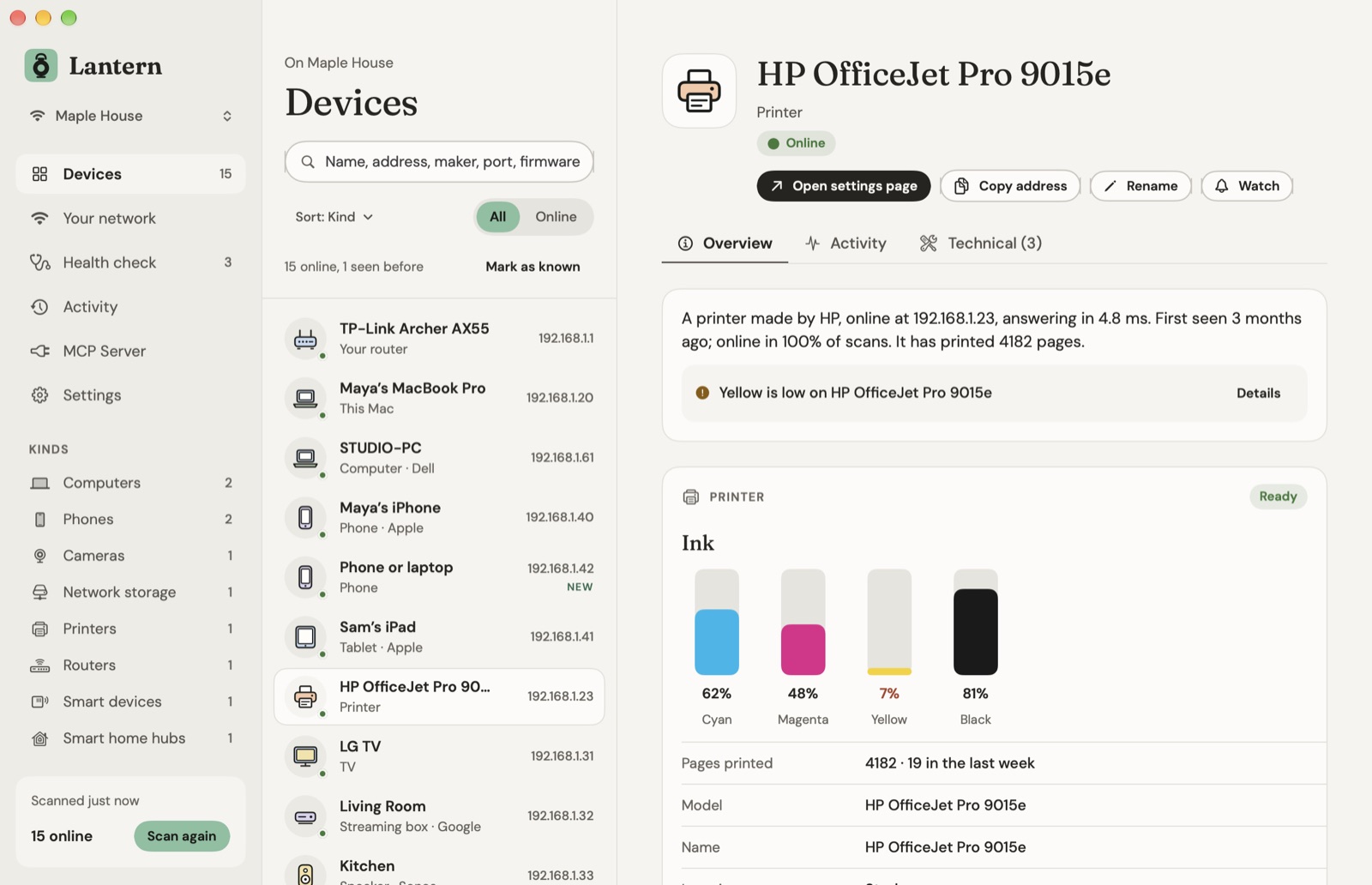
Printers
Ask the printer how much ink is left.
Any network printer that works with AirPrint answers over IPP, no password needed: ink or toner in its own colours, firmware, speed, paper loaded and what's wrong if something is. Many add pages printed and the serial number over SNMP, and Lantern counts the pages week by week.
A low tank gets a notification once, not every scan.
Your router
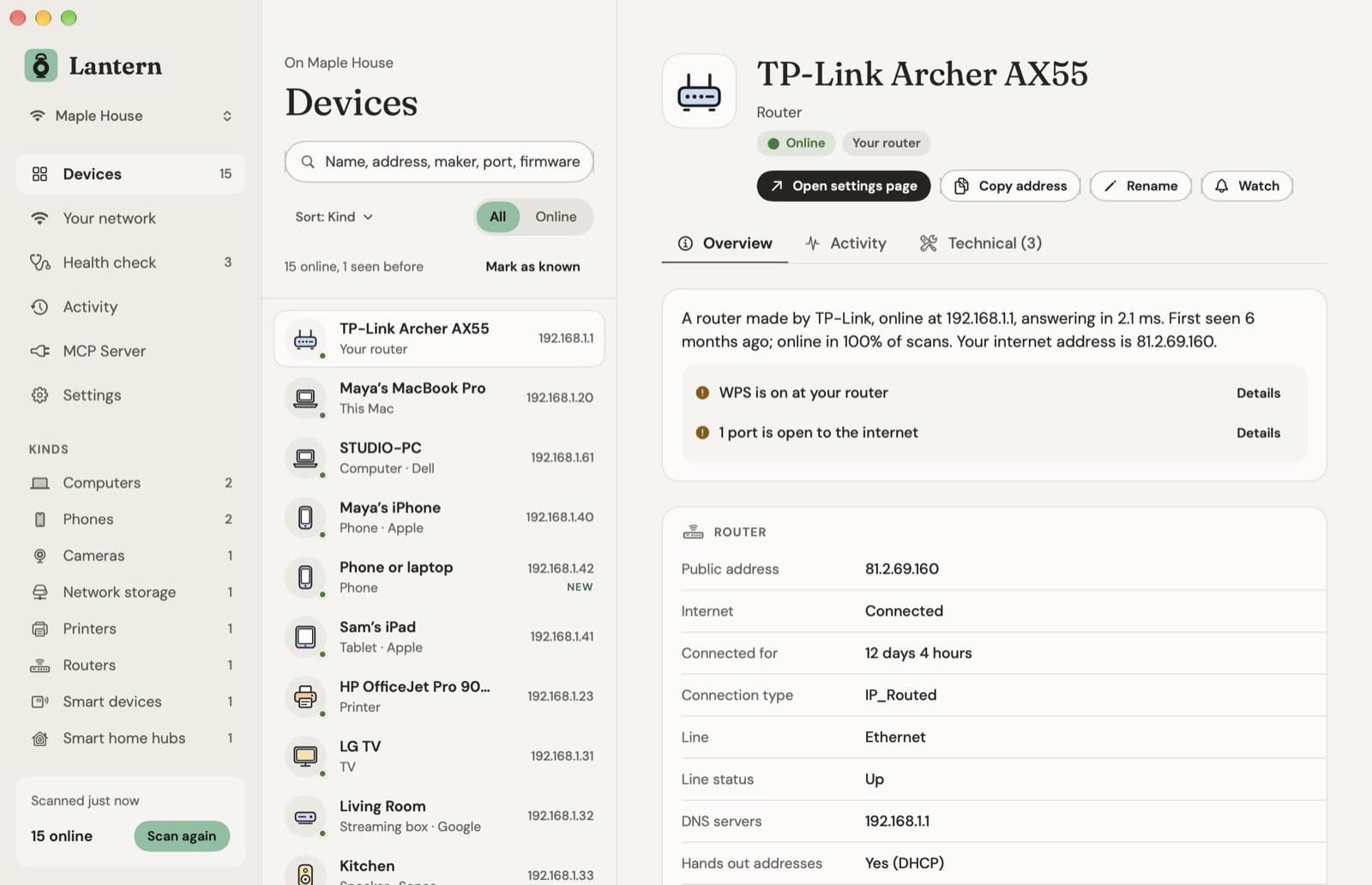
The box in the hall, opened up.
- Model
- TP-Link Archer AX55
- Public address
- 81.2.69.160
- Internet
- Connected for 12 days 4 hours
- Line
- Ethernet, up
- Open to the internet
- TCP 32400 → Archive (Plex)
- Hands out addresses
- Yes, a 1-day lease
- Wi-Fi
- Channel 44, 5 GHz, 80 MHz, WPA2/WPA3
From the router's own UPnP description and status, read without its password. One button opens its settings page.
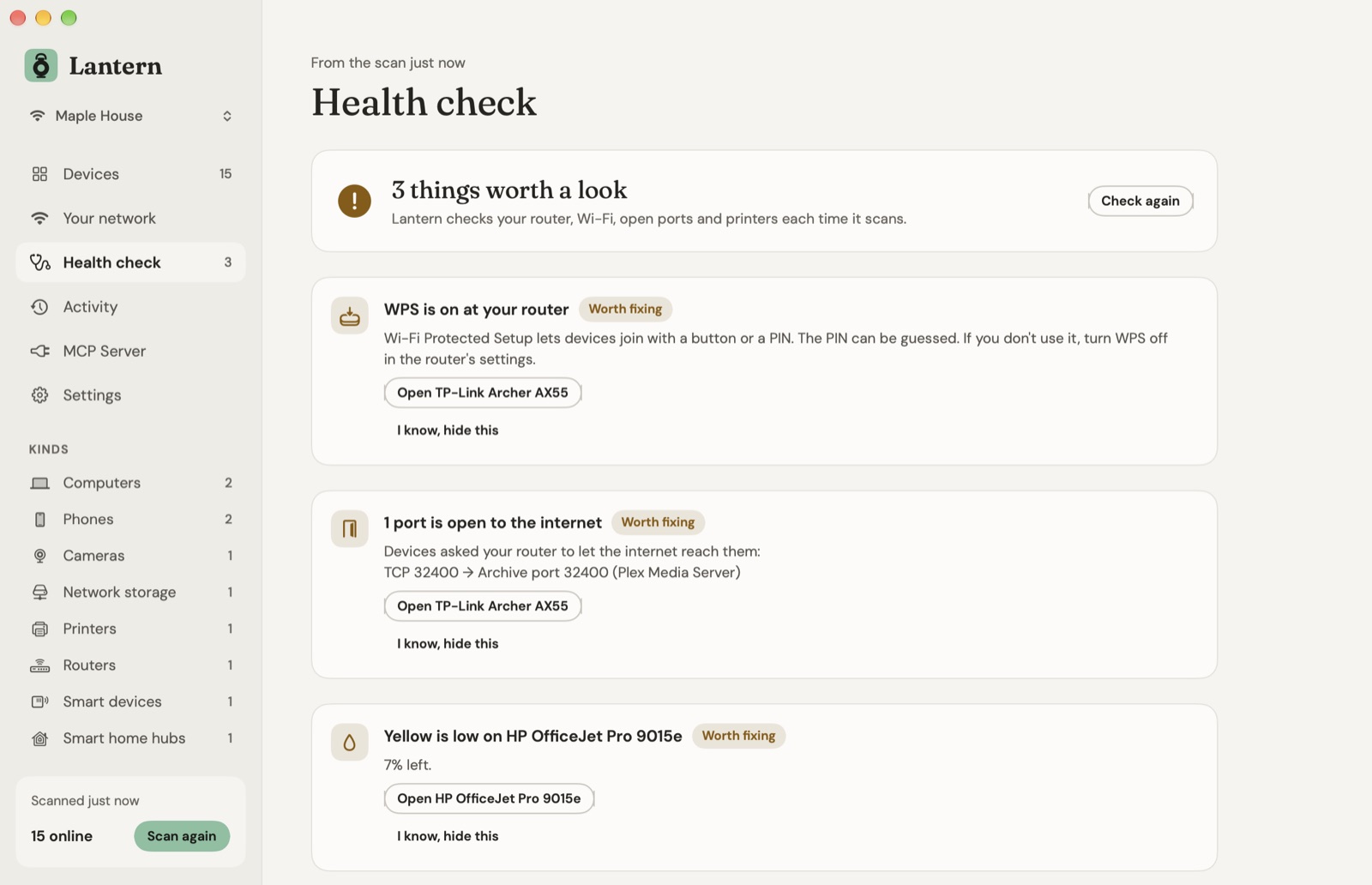
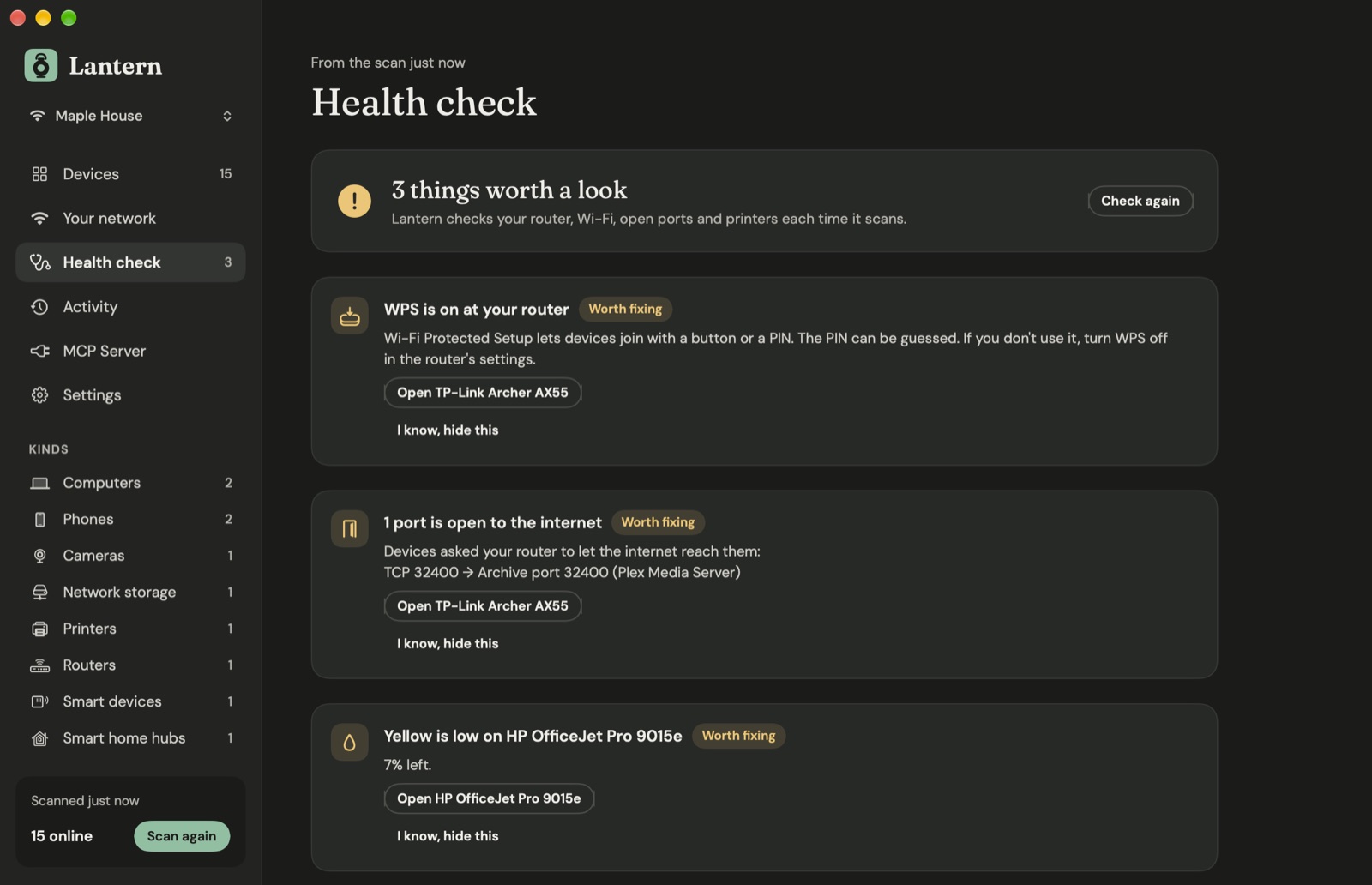
Health check
Ten things worth knowing.
Checked every time Lantern scans, explained in plain words, with the device to open.
Double NAT
Your router's internet side has a private address, so another box is in front of it. Games and calls notice.
WPS left on
The PIN can be guessed. Lantern spots routers that still announce it.
Open or WEP Wi-Fi
No password, or one that breaks in minutes. Old WPA gets a nudge too.
Weak signal
Below about -70 dBm, calls stutter. Lantern tells you where you sit.
Crowded channel
How many networks share yours, and a quieter one to pick. Needs Location for the Wi-Fi survey.
Ports open to the internet
What your devices asked the router to forward over UPnP, and to whom.
Risky doors
Telnet, FTP, Remote Desktop and VNC left open on a device.
Default SNMP
A router that answers anyone with the password "public".
Ink and printer errors
Low ink or toner, paper jams, a door left open.
Strangers
New devices since the last scan, and ones that won't say what they are.
A quieter channel
Lantern counts the networks on each Wi-Fi channel around you and points to a quieter one. macOS shares nearby networks only with apps allowed Location; Lantern never reads where you are.
Fix it where it lives
Each finding opens the device it's about, and its settings page is one more click.
Hide what you already know
Keeping WPS on on purpose? Say so once and that finding moves to a hidden list until you want it back.
Activity
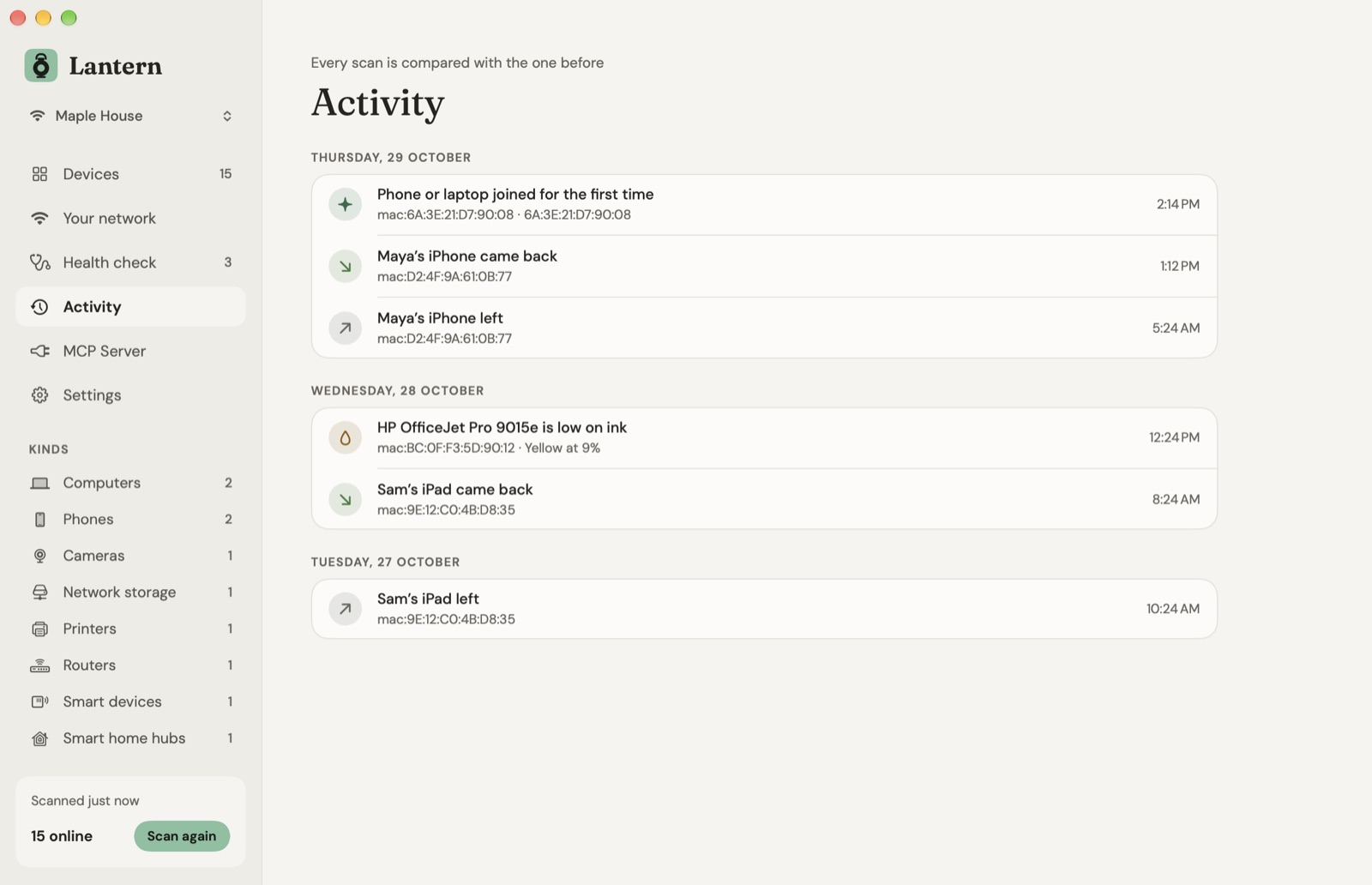
Notice a stranger.
- 11:40A phone or laptop joined for the first time192.168.1.42 · private address
- 10:58Maya’s iPhone came back192.168.1.40
- YesterdayHP OfficeJet Pro 9015e is low on inkYellow at 9%
- TuesdaySam’s iPad left192.168.1.41
Lantern scans by itself every 5, 15 or 60 minutes and when your Mac wakes, and compares each scan with the one before. Tell it to watch the kids' iPads or the office printer and it lets you know when they come and go.
A lantern in the menu bar shows what's online, what's new and what needs a look.
Every device
Put a name to everything.
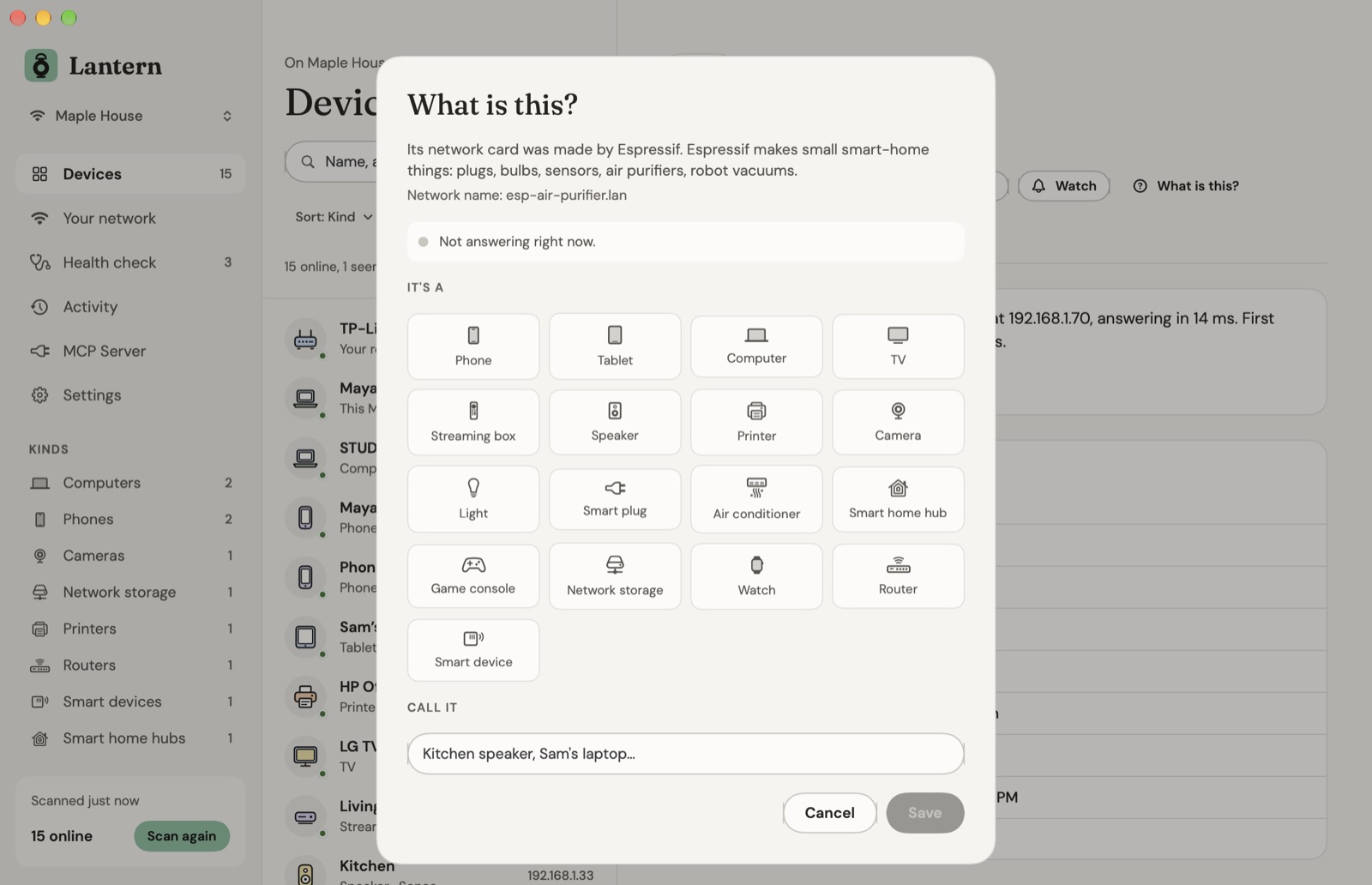
What is this?
For a device that won't say what it is, Lantern tells you who made its network card and what they usually make, what it answers on, and whether it's answering right now. Unplug it and watch the dot go grey. Then pick what it is and give it a name.
Names that stay put
Lantern knows each device by its hardware address, not its IP address, so your names, watched devices and history survive the router handing out new addresses. A phone that makes up a new private Wi-Fi address is matched by the name it announces.
One page per device, in tabs
Overview says in a sentence what it is and whether anything's wrong. Activity has its ping graph and its comings and goings. Technical keeps UPnP, SNMP, services and ports out of the way until you want them.
Sort by kind, name, address, last seen or response time, search ports and firmware too, move with ↑ ↓ and ⌘F, and look back at other networks you've scanned.
On every device
A few tools, right where you need them.
Live ping
One ping a second while the page is open, for the moment the TV starts buffering.
- Now
- 4 ms
- Average
- 4.8 ms
- Best
- 3.8 ms
- Worst
- 12.6 ms
- Lost
- 0%
Wake on LAN
Wake a sleeping computer or NAS from its page, if it's set up to listen.
CSV and PDF
Every device as a spreadsheet, or the whole network with its health check as a report.
Services and ports
What each device announces, with its details, and which of 44 common ports are open, in plain names.
Your own names
Rename a device once you know it. It keeps the name when its address changes, and a newcomer stands out.
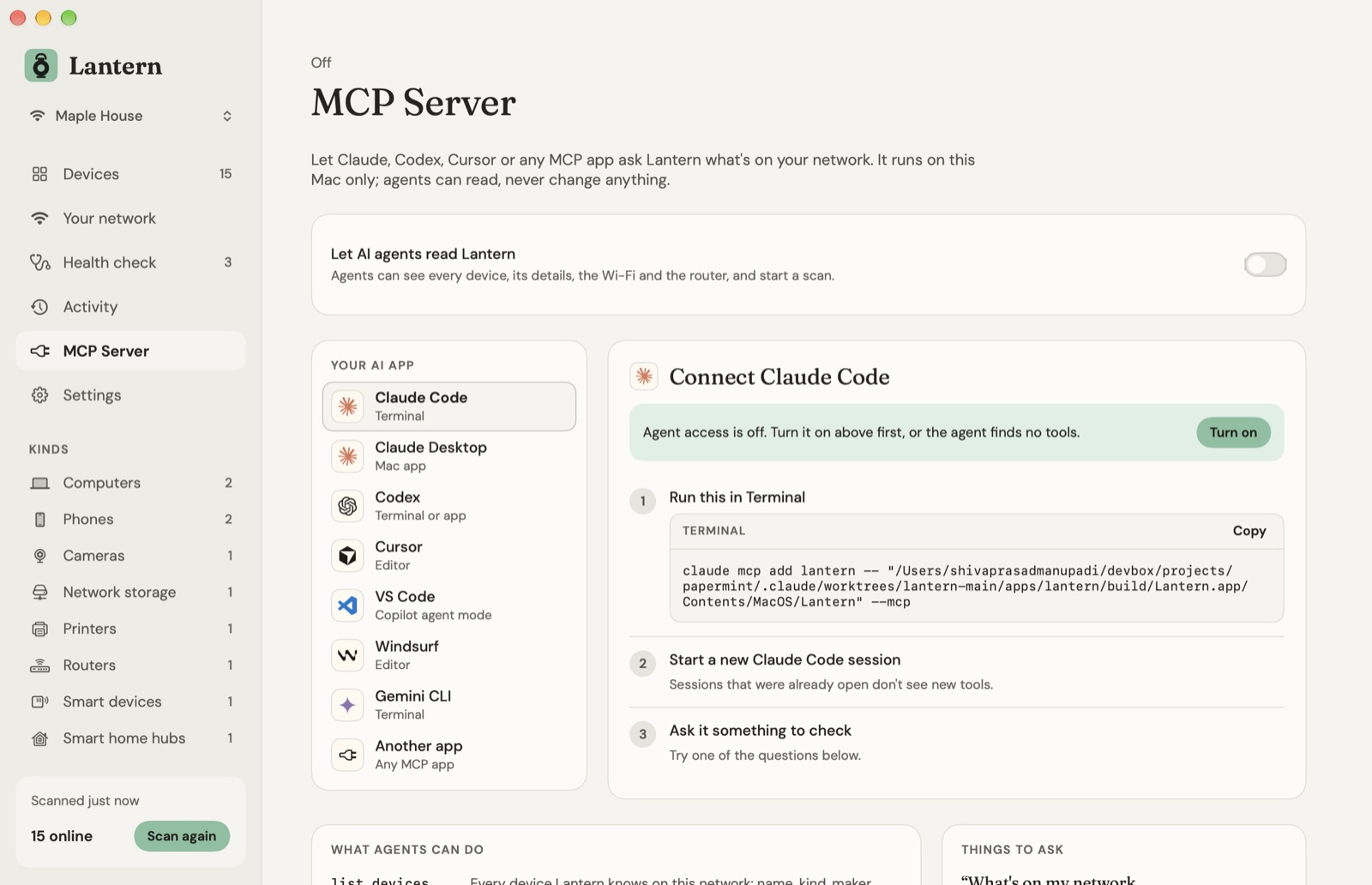
An MCP server, read-only
Let Claude, Codex, Cursor or any MCP app ask what's on your network. Off until you turn it on.
list_devicesget_devicenetwork_infoscan_nownew_devicesprinter_statushealth_check
Shortcuts
- Scan Network
- List Network Devices
- Get Printer Ink
- Is Device Online
Local only
What it finds stays on your Mac.
Lantern talks to the devices on your network. This is everything else that goes online:
- It reads, it never changes. Lantern asks devices what they are. It never logs in to them or changes a setting.
- One file per network, in Lantern's folder on this Mac.
- No analytics, no account. Read the Lantern privacy policy →
Price
Pay once. Look around for years.
Every future update included. Try everything free for 7 days first.
After the trial your last scan still opens; scanning again needs a licence. Licences live at console.papermint.studio. macOS 26 Tahoe or later, Apple silicon. Notarized by Apple. Bought from Papermint through Dodo Payments; prices may vary by country.
Questions
Asked before you download
- Does anything about my network leave my Mac?
- No. Lantern only talks to devices on your own network. The only other things it reaches are Papermint's licence check and Sparkle's update check, which never include anything it found.
- Why does it ask for Local Network and Location?
- Local Network lets it talk to devices on your network at all. Location is optional: macOS shares the Wi-Fi network's name, and nearby networks for the channel check, only with apps allowed it. Lantern never reads where you are.
- Can it see ink levels on my printer?
- Any network printer that works with AirPrint reports its ink or toner levels, firmware and status over IPP, without a password. Many also report pages printed and the serial number over SNMP.
- Why is a phone called “Phone or laptop”?
- Phones and laptops make up a private hardware address for each Wi-Fi network, so the maker is hidden. Rename it once you know whose it is, and Lantern keeps your name.
- What does it cost?
- Free for 7 days, then $9.99 once for one Mac, with every future update. After the trial your last scan still opens; scanning again needs a licence.
- Why isn't it on the Mac App Store?
- Lantern reads the Mac's ARP table and sends pings to find quiet devices, which sandboxed App Store apps can't do. It's downloaded from us instead, signed and notarized by Apple.
Every device on your network, in detail.
Free for 7 days, then $9.99 once. macOS 26 or later, Apple silicon.
DownloadmacOS 26+ · Apple siliconMore from Papermint
Other apps, same promise.
 WhittleVoice notes that write themselves
 KeepersA photo cleaner you swipe
 SketchyColoring pages for kids
 LumenA photo viewer for the Mac
 PennyBookA private expense tracker
 Porter.local names for dev servers
 AlmanacSee which app is behind it
 RoostWindows back where they belong
 WinnowClear your Mac, keep a way back
 WrenTalk, and it types
 SheafEvery PDF tool, on your Mac
 UnfurlA journal that fills itself in
 TacetA clipboard that keeps keys quiet
 OrielScreenshots and recordings, kept local