
Oriel
- Mac
Screenshots and recordings that stay on your Mac.
Capture any part of the screen, mark it up, record a walk-through and tidy it in Studio. Every capture waits in a Library that finds the words inside it, and none of it is uploaded anywhere.
- Area, window, screen, scrolling
- Markup and backgrounds
- Recording with Studio
- Search inside captures
- Nothing leaves your Mac
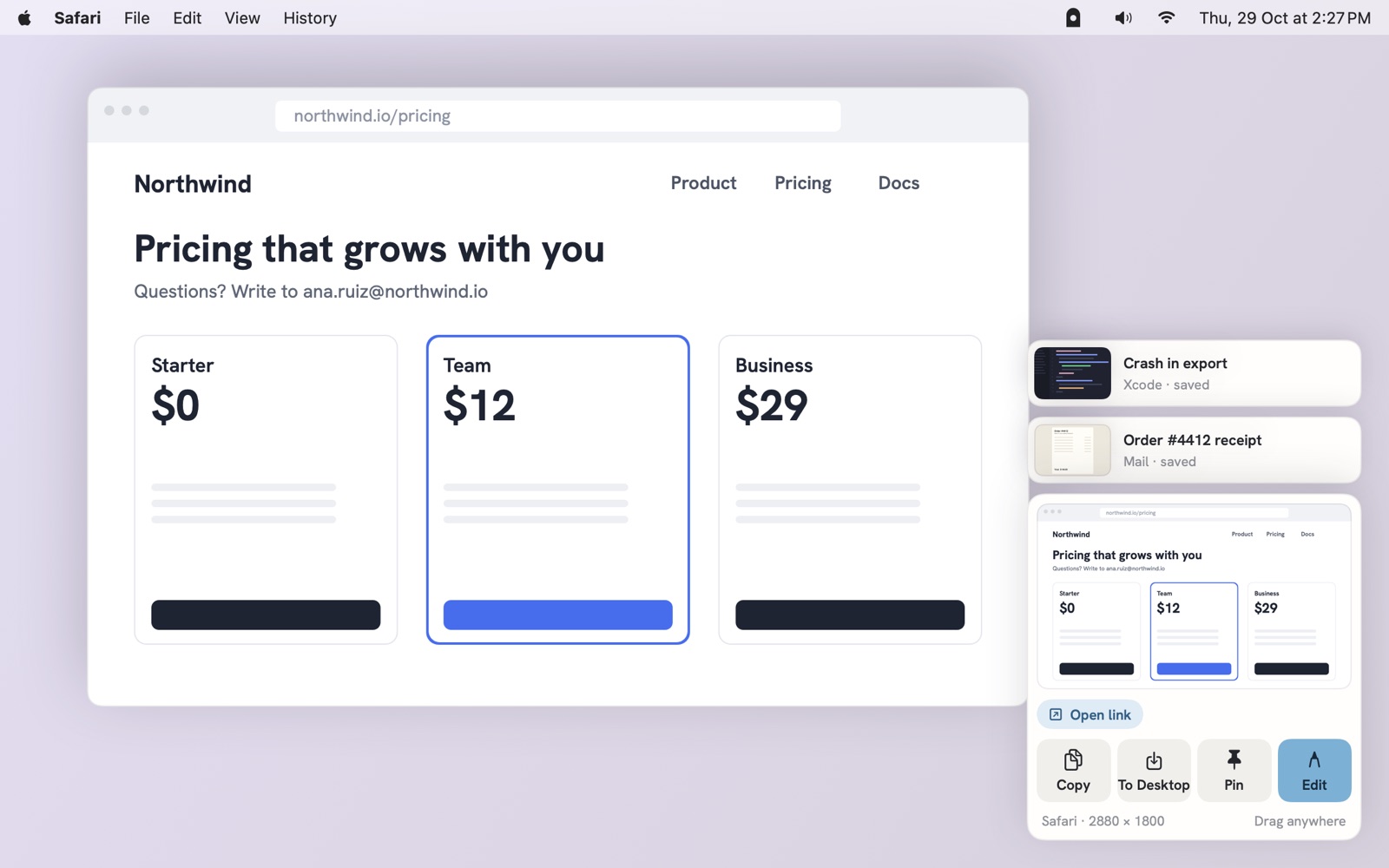
Capture
One key for every kind of screenshot.
An area, a window, the whole screen, a page too long to fit, or just the words on it. The screen, scrolling and record keys can also take over the Mac's own.
- ⇧⌘1
Area
Drag over any part of the screen.
- ⇧⌘2
Window
One window, even with others on top of it.
- ⌥⇧⌘3
Screen
The whole display; the notch strip trimmed.
- ⌥⇧⌘4
Scrolling
A long page, scrolled and stitched for you.
- ⌥⇧⌘5
Record
A display, a window or an area, as video.
- ⇧⌘6
Copy text
The words in an area, straight to the clipboard.
- ⌥⌘R
Ruler
Measure in pixels and pick any colour.
Then a card, in the corner
Each capture waits in a small card: copy it, save it, pin it above every window, open it to mark up, or drag it straight into Mail, Slack or a code review. It tucks itself away after a few seconds.
- A link or a QR code
- Open link
- Code
- Copy as text
- A table
- Copy as CSV
Self-timer, the same area again, and a pixel ruler with a colour picker live in the menu bar.
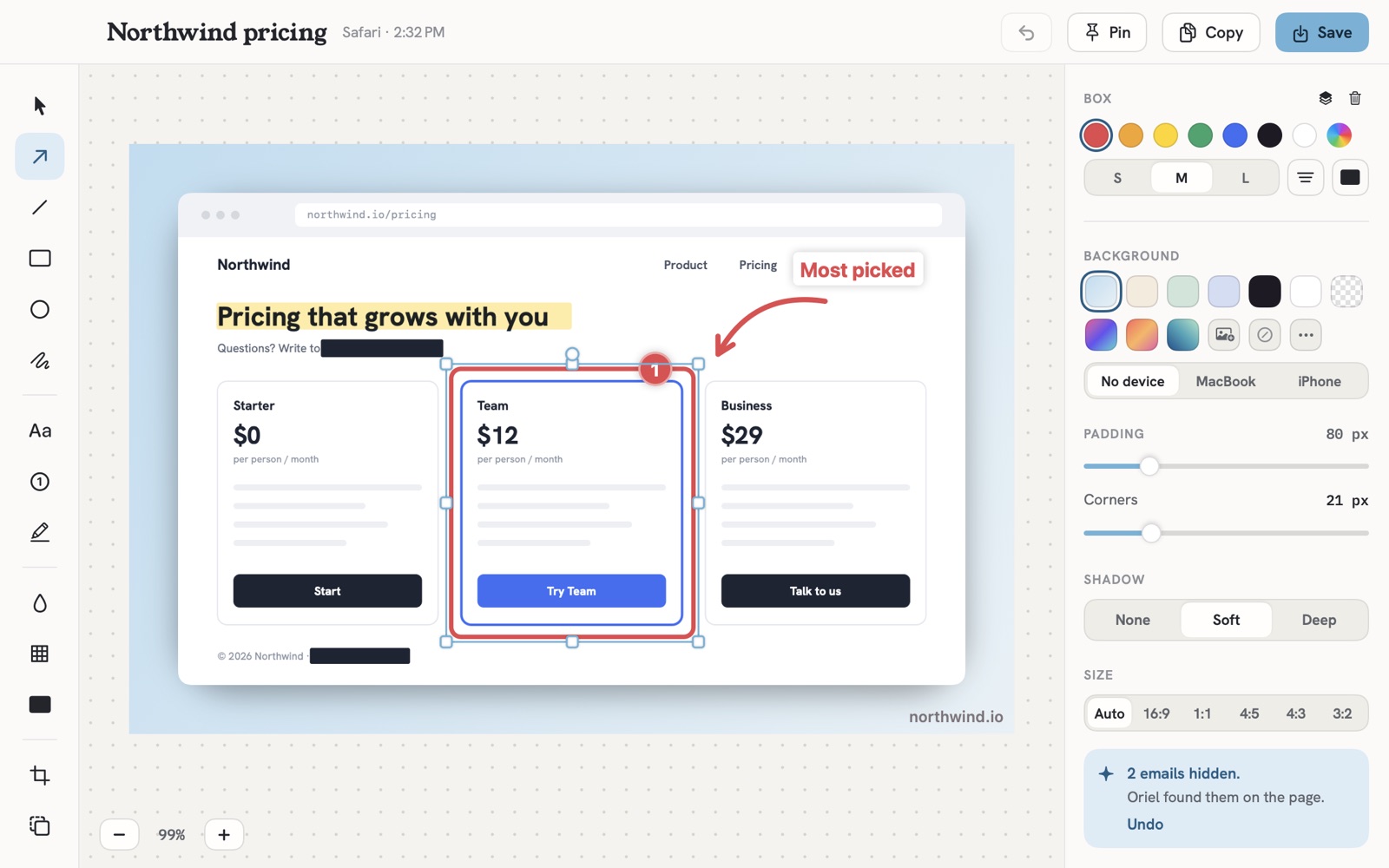
Markup
Point at the part that matters.
- Arrow
- Line
- Box
- Oval
- Pen
- Text
- Numbered steps
- Highlight
- Blur
- Pixelate
- Redact
- Crop
- Background
Set the shot on a colour with padding, rounded corners and a soft shadow, at the size the post or slide needs. Copy or save, and the original stays in the Library to mark up again.
Emails and keys, hidden for you. Oriel looks for email addresses, API keys, tokens and card numbers in every shot and covers them. Undo if you meant to show them.
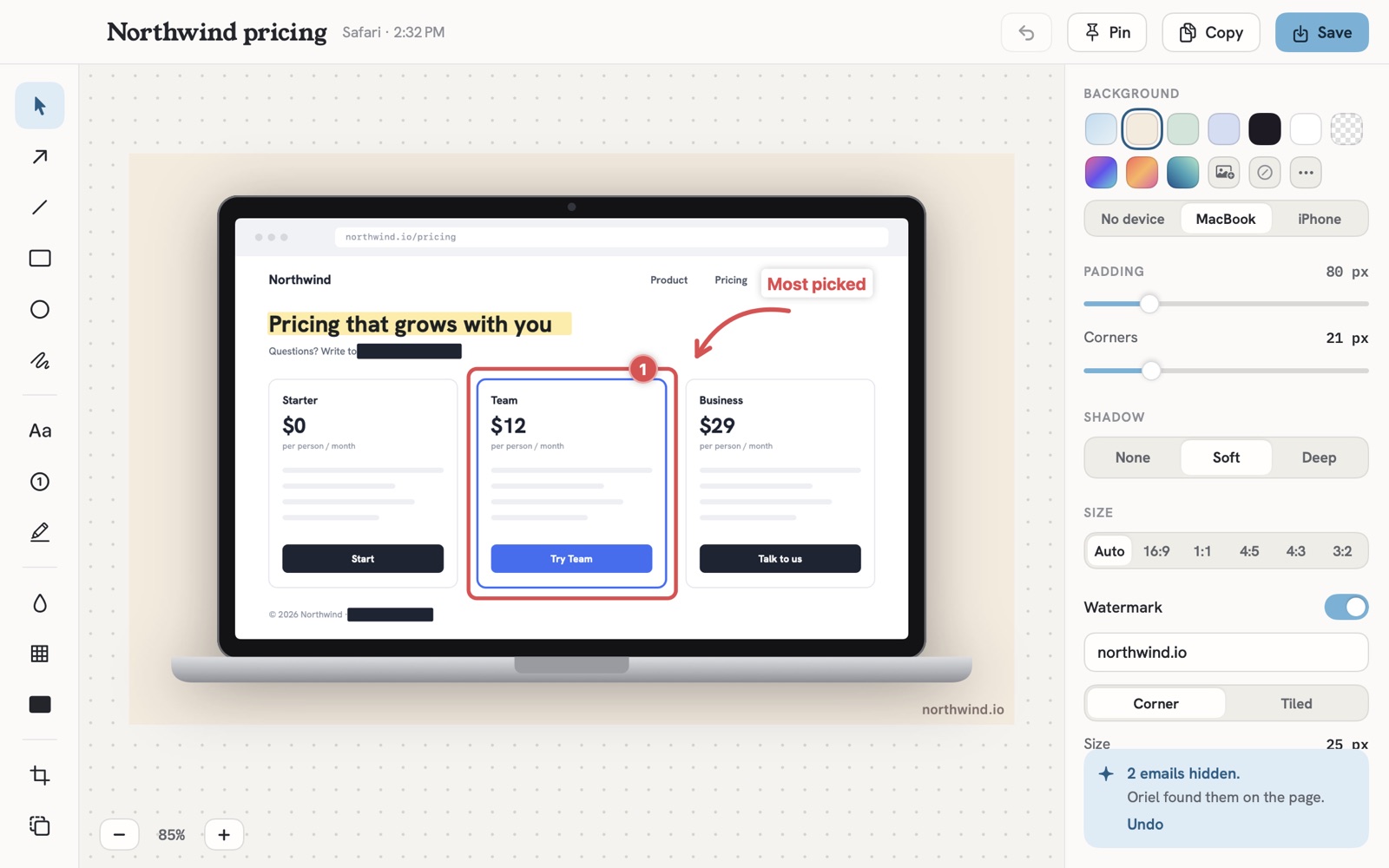
In a MacBook or an iPhone
Drop the shot into a device frame, add a watermark in the corner or tiled, and it's ready for a page or a post.
Sizes
- Auto
- 16:9
- 1:1
- 4:5
- 4:3
- 3:2
Recording
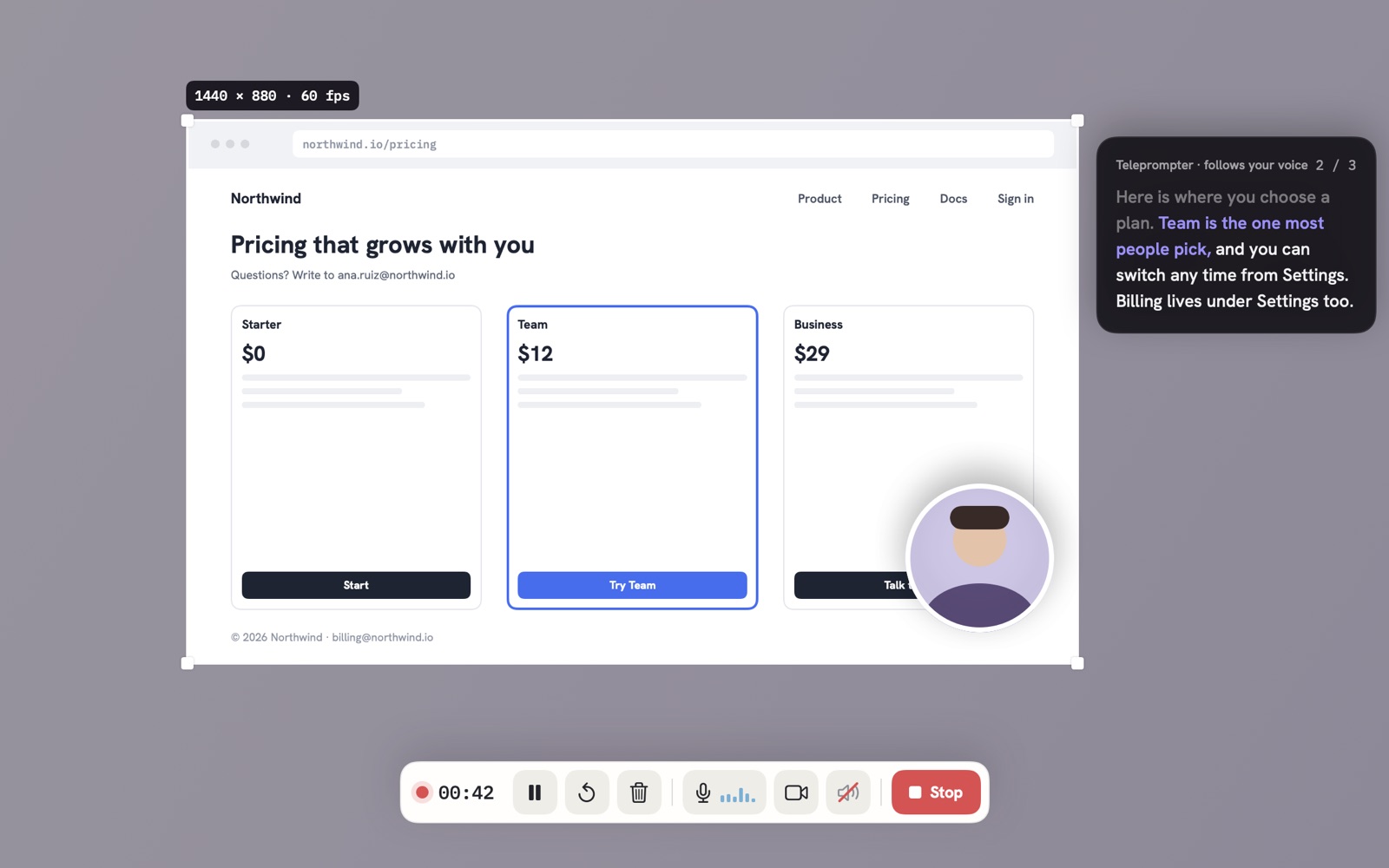
Record the screen, and yourself if you like.
A display, a window or an area you draw. Your camera in a bubble, your microphone, and the Mac's own sound, each kept on its own track so you can turn one down later.
- A teleprompter beside the recorded area that moves along as you speak, and never shows up in the video.
- Pause, restart or discard from the record bar, with a countdown before you start.
- Keys pressed are noted, so viewers can see the shortcut you just used.
Studio
The editor does the tedious parts.
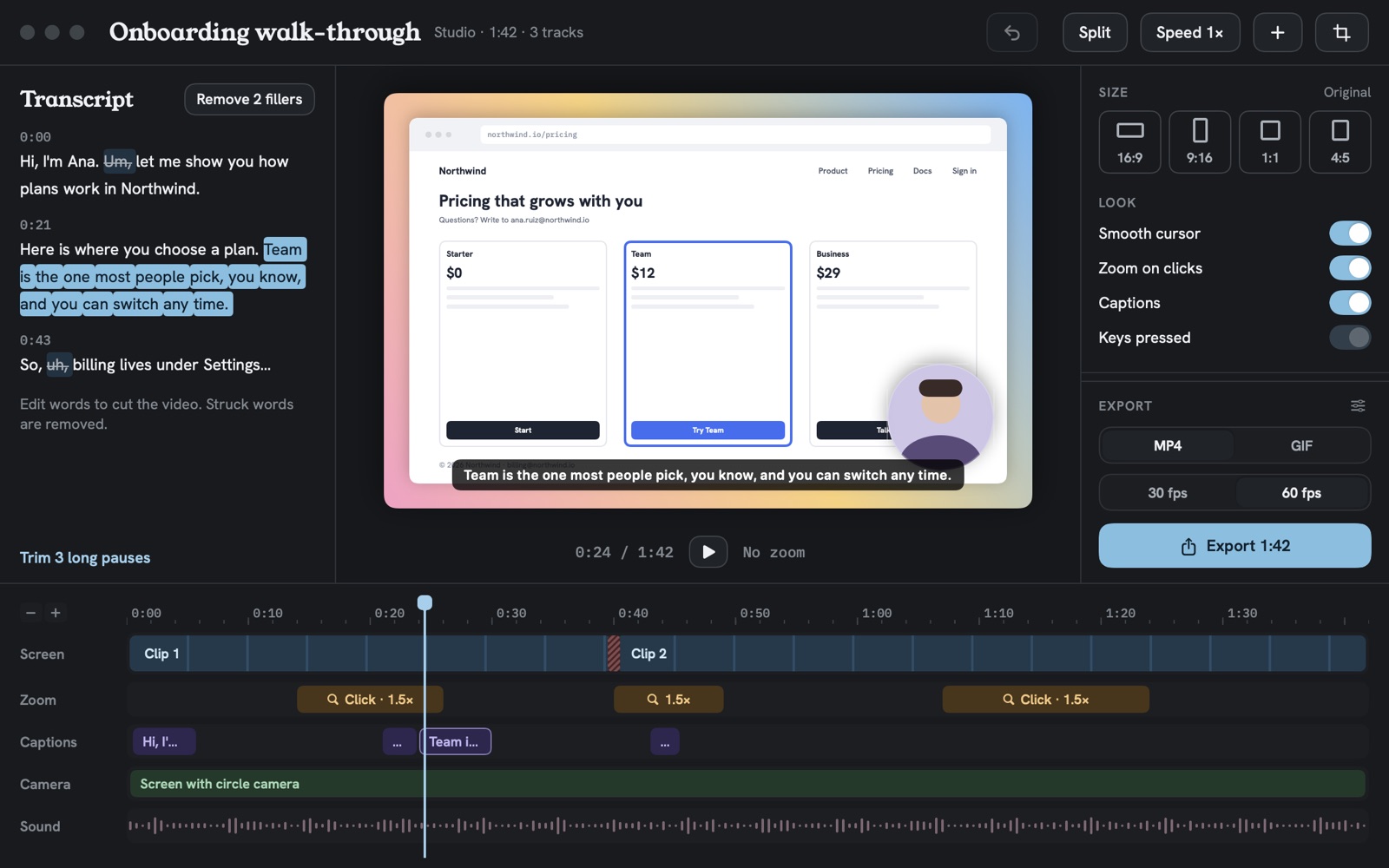
Studio never touches the take. It zooms where you clicked, writes captions from what you said, and lets you cut a video by editing its words.
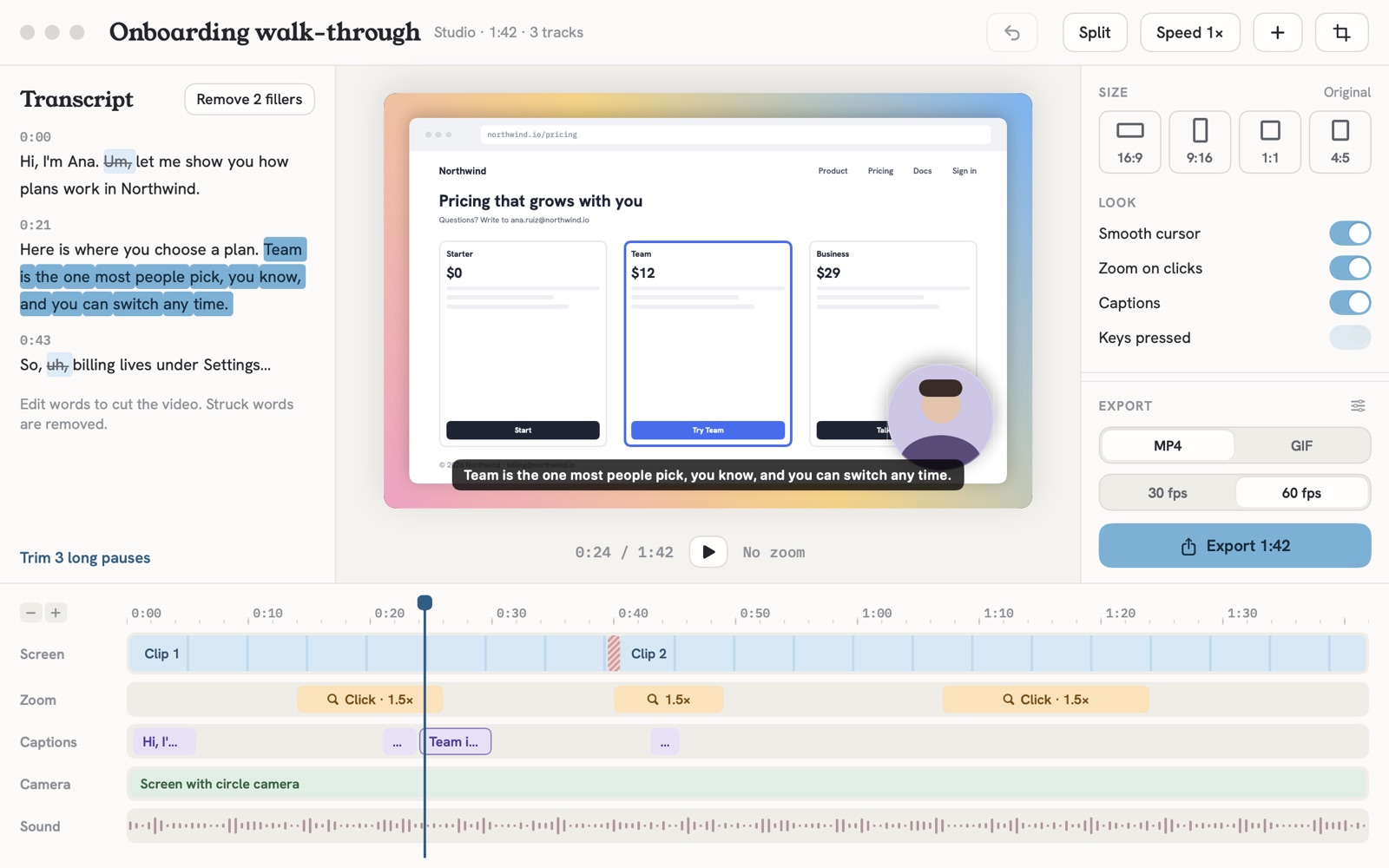
0:00Hi, I'm Ana.Um,let me show you how plans work in Northwind.
0:21Here is where you choose a plan.Team is the one most people pick,you know,and you can switch any time.
0:43So,uh,billing lives under Settings.
Strike a word and it's gone from the video.
Screen
Split, trim and speed up the take.
Zoom
Zoom in where you clicked, then back out. Move or delete any of them.
Captions
From the words you say, on your Mac. Fix a word, the caption follows.
Camera
Your camera on its own track, as a bubble over the screen.
Sound
Your voice and the Mac's sound on their own tracks.
MP4 or GIF
MP4 at 30 or 60 fps, or an animated GIF with a file size to aim for, for a README or a pull request.
Four shapes
16:9 for a page, 9:16 for a phone, 1:1 and 4:5 for a feed, from the same take.
Fillers and pauses
Take out every um and uh, and shorten the long silences, in one click each.
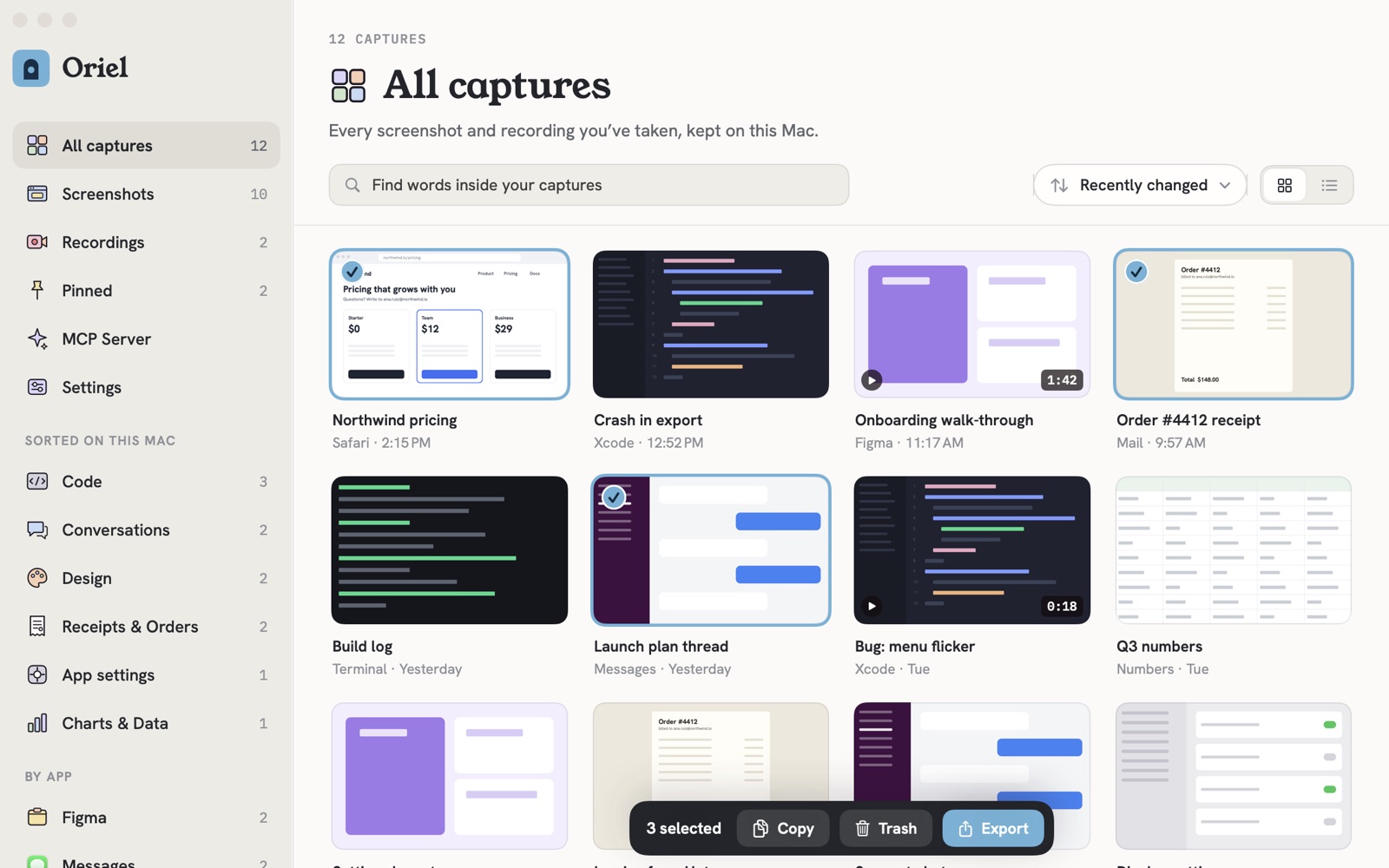
Library
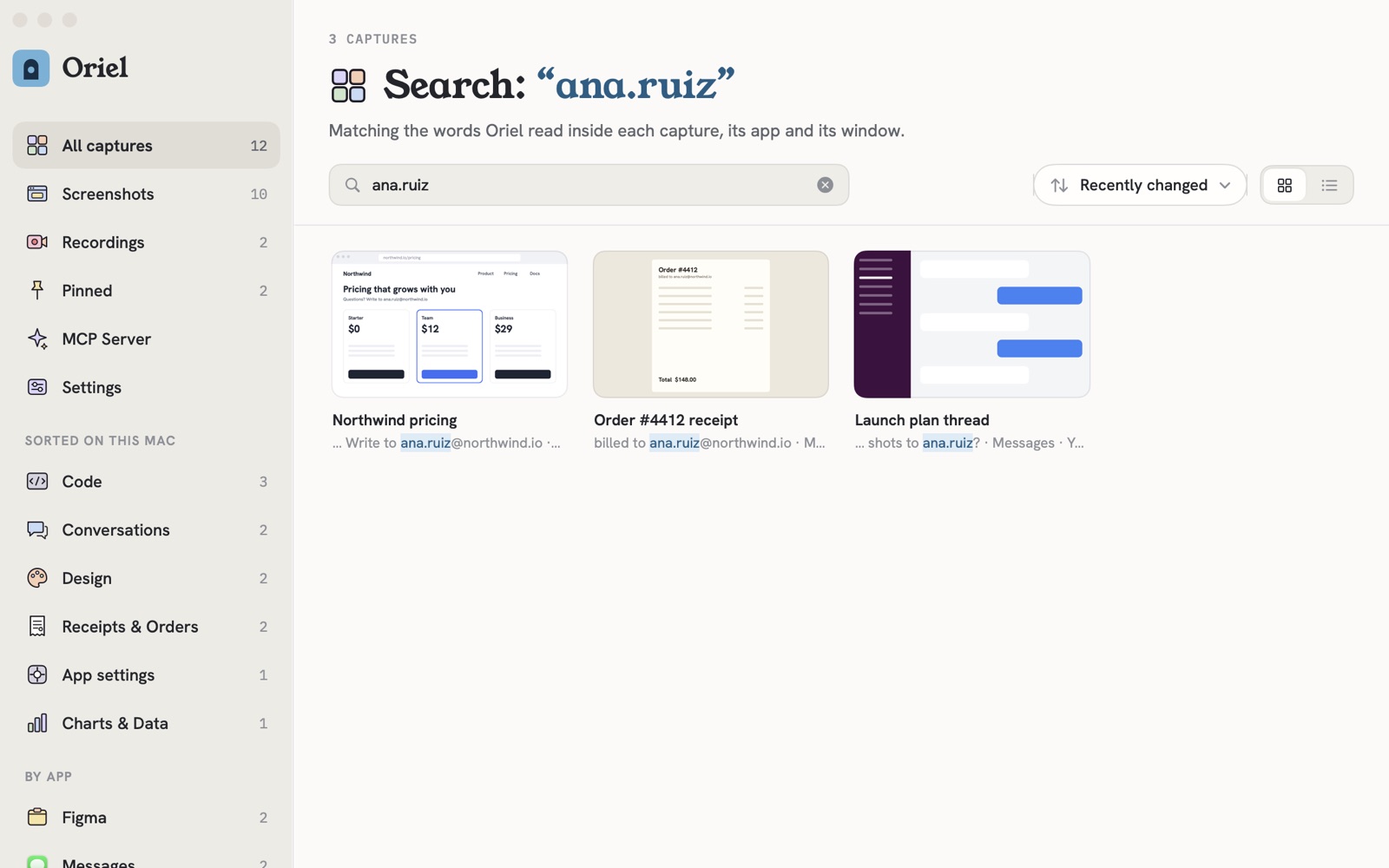
Find a screenshot by what it says.
- Northwind pricingSafariQuestions? Write to ana.ruiz@northwind.io
- Order #4412 receiptMailBilled to ana.ruiz@northwind.io
- Launch plan threadMessagesCan you send the shots to ana.ruiz?
Oriel reads the text inside every screenshot and recording on your Mac, so an email address, an error message or an order number finds the capture it's in. It matches the app and window, too.
- Code
- Conversations
- Design
- Receipts & Orders
- App settings
- Charts & Data
New captures are sorted into groups like these, and by the app they came from.
For coding agents
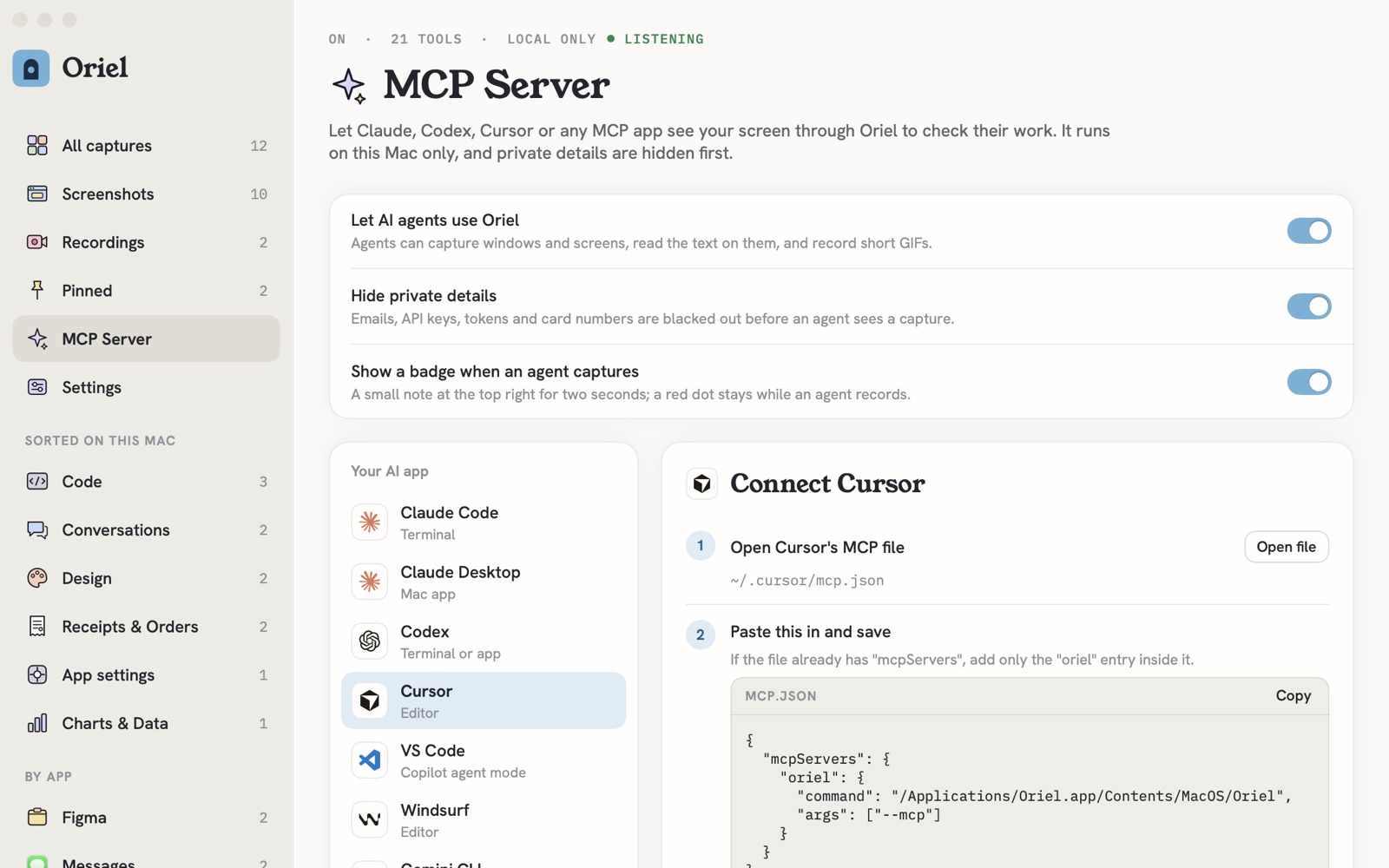
Let your agent see what it built.
Turn on the MCP server and Claude Code, Codex, Cursor or any MCP app can capture a window, read the text on screen, find a button, compare before and after, mark up a shot and record a short GIF to check its work.
capture_windowcapture_screenread_textfind_textcompare_imagesannotaterecord_gifstart_recordingsearch_captures
21 tools. Private details are blacked out before an agent sees a capture, a small badge shows when one looks, and only apps on this Mac can ask. Setup steps for Claude Code, Claude Desktop, Codex, Cursor, VS Code, Windsurf, Gemini CLI.
Local only
Your captures stay on your Mac.
No account and no uploads. This is every part of Oriel and what it can reach:
- One folder on this Mac. Captures, Studio projects and the text read from them live in Oriel's folder in Application Support.
- Reading is yours to turn off. Search then matches names, apps and windows only.
- No analytics, no account. Read the Oriel privacy policy →
Price
Pay once. Capture for years.
Every future update included. Try everything free for 7 days first.
After the trial your Library still opens; new captures and recordings need a licence. Licences live at console.papermint.studio. macOS 26 Tahoe or later, Apple silicon. Notarized by Apple. Bought from Papermint through Dodo Payments; prices may vary by country.
Questions
Asked before you download
- Does anything I capture leave my Mac?
- No. Screenshots, recordings and the text read from them stay on your Mac. Oriel only goes online for Papermint's licence check and Sparkle's update check, which never include anything you captured.
- Why does it ask for Screen Recording?
- macOS needs it for any app that takes screenshots or records the screen. Oriel only looks when you capture. Microphone, camera, Accessibility (for scrolling captures) and Input Monitoring (for keys pressed) are asked for only when you use those.
- Can it replace the Mac's screenshot keys?
- Yes, if you like. Area and window are ⇧⌘1 and ⇧⌘2 from the start; in the welcome or Settings you can hand ⇧⌘3, ⇧⌘4 and ⇧⌘5 to Oriel too, or keep its own keys beside the Mac's.
- What can coding agents do with it?
- With the MCP server on, Claude Code, Codex, Cursor and other agents can capture a window, read the text on screen, find a button, compare two images and record a short GIF to check their work. Private details are hidden first, and only apps on this Mac can ask.
- What does it cost?
- Free for 7 days, then $19.99 once for one Mac, with every future update. After the trial your Library still opens; new captures and recordings need a licence.
- Why isn't it on the Mac App Store?
- Oriel is sold and updated directly by us, so it stays one price, paid once, with every update. It's signed and notarized by Apple, and checks that every update is too.
Screenshots and recordings that stay on your Mac.
Free for 7 days, then $19.99 once. macOS 26 or later, Apple silicon.
DownloadmacOS 26+ · Apple siliconMore from Papermint
Other apps, same promise.
 WhittleVoice notes that write themselves
 KeepersA photo cleaner you swipe
 SketchyColoring pages for kids
 LumenA photo viewer for the Mac
 PennyBookA private expense tracker
 Porter.local names for dev servers
 AlmanacSee which app is behind it
 RoostWindows back where they belong
 WinnowClear your Mac, keep a way back
 WrenTalk, and it types
 SheafEvery PDF tool, on your Mac
 UnfurlA journal that fills itself in
 TacetA clipboard that keeps keys quiet
 LanternEvery device on your network